

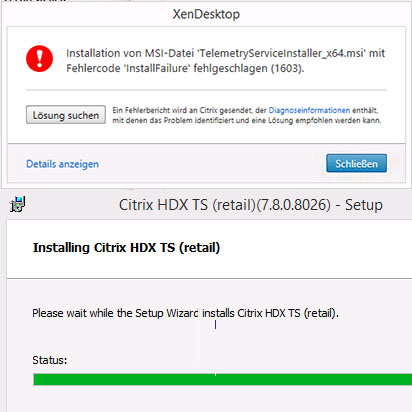
Upgrade of the Citrix Virtual Delivery Agent (VDA) seems to be more and more a problem than a simple thing. I can't understand why the VDA can't be „pushed“ via the DDC's on demand. In the meantime we have to fight Citrix and Microsoft issues to upgrade the VDA. Here are some points to make the upgrade work:
- Citrix uses a „NT Service“ account for the telemetry service and requires rights to log on as a service. This can be done via the group policies, where „NT Service\All Service“ is authorized to register as a service.
XenDesktop 7.8 Install Error - Installation of MSI File „TelemetryServiceInstaller_x64.msi“- http://support.citrix.com/article/CTX207907
- Unable to log on as NT SERVICE
https://support.microsoft.com/kb/2832204
- The upgrade may fail with the following messages error 1603 or 1911 for TelemetryServiceInstaller_x64.msi or IcaTS_x64.msi and caused by a Microsoft security update that comes with the Windows update. Only uninstalling the hotfix KB3072630 fixes the problem.
- Error 1911 Could not register type library for file
http://support.citrix.com/article/CTX201748 - MS15-074: Vulnerability in Windows Installer service could allow elevation of privilege
https://support.microsoft.com/kb/3072630
- Error 1911 Could not register type library for file
- If the upgrade still does not work, then it is due to another Microsoft hotfix KB3139923 and must also be uninstalled first.
- MSI repair doesn't work when MSI source is installed on an HTTP share in Windows
https://support.microsoft.com/kb/3139923
- MSI repair doesn't work when MSI source is installed on an HTTP share in Windows
- Rarely, however, the installation could fail if there are entries in the user's registry
- There should be no Citrix components in the following keys:
HKCU\SOFTWARE\Microsoft\Installer\ProductsHKCU\SOFTWARE\Microsoft\Installer\UpgradeCodes
I had listed ALL the problems before but after that the VDA could be installed without errors.

 German
  English