

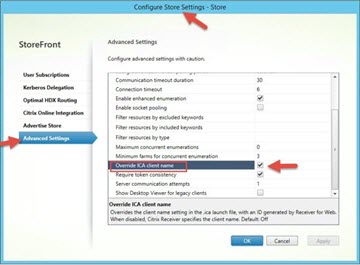
Was described in the Citrix article „“How to implement the Override Ica ClientName feature for StoreFront" as described, the Client Name for the Workspace app (Receiver App Store) cannot be overwritten. Overwriting the Client Name would only work with „Receiver for Web“ (RfW), i.e., the StoreFront website, and then the Client Name one WR_ClientName. This applies to the feature built into StoreFront, which can be enabled via the advanced store settings. Fortunately, there is another, much more flexible option!
My old buddy Simon Frost released an update back in December 2017 that offers significantly more options for customizing the Client Name has. So not just WR_ClientName as with the built-in function, but also with the current Usernames, User domain, Device ID and much more—and these features can even be combined. Ultimately, the possibilities are endless, because the customization is available as source code and can be tailored to your specific needs.
But let's get back to the main point of the article! Simon's code also changes the Client Name of the Workspace App ...accordingly! Aside from the obvious fact that the ClientName is different in the ICA session, this can also be used to achieve something else. Before „Network Locations,“ users of Citrix DaaS were unable to distinguish between internal and external connections. If on-premises StoreFront servers are connected to Citrix Cloud and the ClientName is changed, this can be used in Citrix policies to distinguish between them. If the user connects via DaaS StoreFront, then the Client Name immediately Client Name, but internally it would then be, for example,. WR_ClientName. This would allow a Citrix policy to permit client drive mapping only for client names of the form WR_ClientName.
An adjustment to the Client Name in Citrix DaaS StoreFront I haven't been able to find it yet. Here's the link to Simon's code Rewriting the session client name from the storefront, Thanks to Simon Frost!
 German
  English