


WWhile I was recently searching the internet for information on Server 2016 performance issues, I came across an interesting article from Microsoft explaining a new optimization in Windows. This new feature has actually been around since Windows 7, but it has been further developed and was only enabled by default in the Windows 10 client version. Unlike the client version, this feature was disabled in the 2016 and 2019 server editions, but it can be enabled via a simple PowerShell command. Unfortunately, I couldn’t find any information about this feature in the context of multi-user systems (Remote Desktop Services). So I wondered whether this feature might also enable an immediate improvement in performance or user experience on session hosts. Some of my clients are currently testing this, and I’m waiting for their results. Would you like to do the same?
„What function is that?" you ask. The function is called "Memory Compression“and is enabled by default in Windows 10. Open Windows Task Manager, go to Performance, then Memory, and you’ll find: in use (compressed).
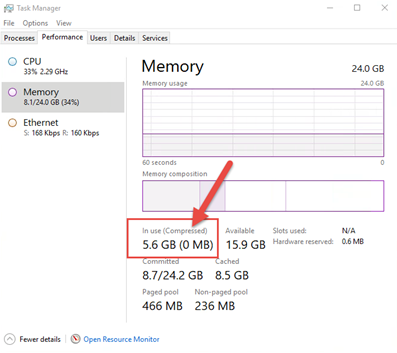
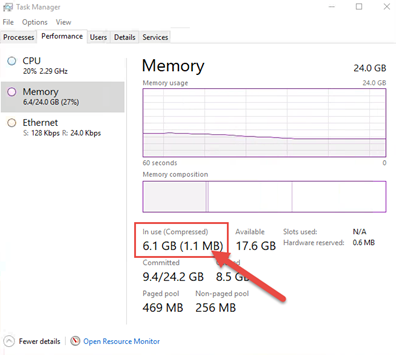
Since the previous screenshot, I've enabled compression and opened a few applications. There is still plenty of RAM available (17.6 GB), but Windows has started paging, this time compressed into RAM!
What do you think? Let me know if you've tried Memory Compression! I'm curious to hear about your experiences with Memory Compression!
References
- How Windows 10 Manages Memory
https://www.onmsft.com/news/microsoft-educates-insiders-windows-10-handles-memory - Video on Memory Compression in Windows
https://channel9.msdn.com/Blogs/Seth-Juarez/Memory-Compression-in-Windows-10-RTM - Microsoft: Enable-MMagent -MemoryCompression
https://docs.microsoft.com/en-us/powershell/module/mmagent/enable-mmagent?view=win10-ps


 German
  English