

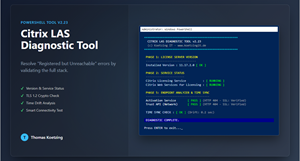
SError message: „Registered, but LAS endpoint is unreachable“.
Everyone is familiar with this error in the Citrix Cloud console. It claims that the endpoint is unreachable, even though the firewall logs show that everything is fine.
The problem is rarely just the network. Often it is a combination of outdated software versions, suspended services, Time Drift or missing TLS 1.2 registry keys. Standard tests such as Test NetConnection are not sufficient here, as they lack the context at the application level.
I wrote a PowerShell diagnostic tool to solve the problem once and for all.
What the tool does (Version 2.23):
-
Version Check: Checks whether the license server meets the minimum requirement (11.17.2.0) for Cloud LAS.
-
Service Watchdog: Checks whether critical services (
Citrix Licensing,Web Services) and attempts to start them automatically if they have stopped. -
Time Sync: Detects time discrepancies between the server and the cloud (critical for OAuth tokens).
-
A Real Connectivity Check: Technically interprets HTTP 403/404 as successful Connection (Green/OK).
-
SSL verification: Confirms that the handshake is secure and valid.
If this tool shows „Green,“ the infrastructure is working properly, and you can focus on the actual problem.
IMPORTANT: In the Studio, under "Licensing," don't forget to Migration button Press it!.
Download: Citrix-LAS-Tool.ps1
 German
  English