

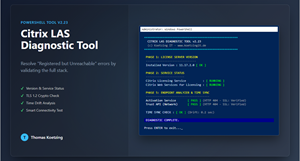
SError message: „Registered, but LAS endpoint is unreachable“.
Everyone is familiar with this error in the Citrix Cloud console. It claims that the endpoint is unreachable, even though the firewall logs show that everything is fine.
The problem is rarely just the network. Often it is a combination of outdated software versions, suspended services, Time Drift or missing TLS 1.2 registry keys. Standard tests such as Test NetConnection are not sufficient here, as they lack the context at the application level.
I wrote a PowerShell diagnostic tool to solve the problem once and for all.
What the tool does (Version 2.23):
-
Version Check: Checks whether the license server meets the minimum requirement (11.17.2.0) for Cloud LAS.
-
Service Watchdog: Checks whether critical services (
Citrix Licensing,Web Services) and attempts to start them automatically if they have stopped. -
Time Sync: Detects time discrepancies between the server and the cloud (critical for OAuth tokens).
-
A Real Connectivity Check: Technically interprets HTTP 403/404 as successful Connection (Green/OK).
-
SSL verification: Confirms that the handshake is secure and valid.
If this tool shows „Green,“ the infrastructure is working properly, and you can focus on the actual problem.
IMPORTANT: In the Studio, under "Licensing," don't forget to Migration button Press it!.
Download: Citrix-LAS-Tool.ps1
That's awesome, thanks so much for the script!
That was a big help.
However, there appears to be an error in the detection of the WinHTTP proxy.
Thanks for the feedback. If I have time, I'll make the changes, but 4/15 isn't that far off.
Thanks, Thomas
There is a Citrix article that notes that a problem like the one you're experiencing can occur.
https://support.citrix.com/external/article/CTX695960
Hi,
Christian
After you update the configuration, the License Server will point to the LAS EU region instead of the US region.
After 24 hours, products activated through this License Server will appear in Citrix Cloud. During this time, there will be no issues with LAS activations, and they will continue to receive daily renewals.
Remove the license server from the US region tab. Click the three dots next to the server, and then click Remove, as shown below.
Hi Christian,
Thanks for the info, but that's all old news. I'm extremely busy and don't always have time for that.
Thomas