

BWhen using Citrix StoreFront with the native Workspace app, there are two very unpleasant pitfalls. The result is that users Do not start a new session or, at best, have to reset their Workspace app! The changes are minor, but they can seriously disrupt your current environment. So here are the things you should watch out for and keep in mind.
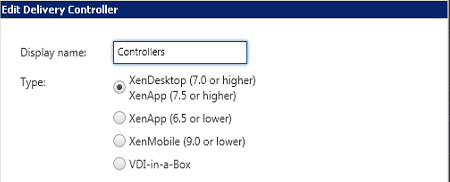
Let’s start with the display name of the StoreFront Delivery Controller. In the early days of StoreFront and with the old web interface, you could change the display name at any time without worrying that it might cause any problems. Those days are now over, and once you’ve changed the display name of the Delivery Controller for an existing StoreFront store, you can no further sessions will be started! The reason for this is that Citrix now uses this name in the startup prompt! You will see a Error You'll see the following in the event log: „Failed to launch the resource .. $S5-9 as it was not found.“ So you need to rename the display name back to: . In my opinion, this is a undesirable development, because a „display name“ should not have such an effect. If the administrator changes the display name, Citrix should also change the startup string.
Next up is the StoreFront Store ID. Never heard of it? Every store within StoreFront has a unique identifier, the „Store ID.“ When you use the Workspace app and connect to a store for the first time, the Store ID—along with many other pieces of information—is sent to the client and used during registration. That’s why you can have multiple „Store“ names in the Workspace app—even though they’re all called „Store,“ they each have their own Store ID. You can find the Store IDs in the registry under HKCU\Software\Citrix\Receiver\SR\Store or in the web.config file in the store folder within the IIS directory.
What's the problem, you ask? If, for whatever reason, you need to set up a new storefront that doesn't join the cluster, and you haven't created a backup of the configuration using a PowerShell command, you'll be assigned a new store ID, and existing Workspace app users will no longer be able to launch anything. Users will then need to reset the Workspace app to obtain the new Store ID, and then everything will work again.
Therefore, make sure you have a backup of your StoreFront configuration: Export and import the storefront configuration
 German
  English