


SHave you ever used the web interface? Session Sharing Key Heard of it? Probably not, but I suspect that some companies are having issues with the sharing key and don't even realize it. Of course, you'll notice that sessions aren't being „shared“ or that a new session is even starting on the same XenApp server. A few years ago, I wrote an article about Understanding Citrix Seamless Engine As I’ve written and explained, „sharing“ poses challenges when publishing applications. The Web Interface Session Sharing Key is a different matter, which I’d like to explain in this article.
The session sharing key comes into play when
- The Web Interface page and the use of the Online/Offline plug-in at the same time
- Web interface page for launching the session desktop, including the online/offline plug-in
- Web interface page for launching a VM desktop (xenDesktop) and the Online/Offline plug-in within it
Web Interface and the Web Interface Service page
When Citrix designed the Web Interface, they didn’t anticipate that companies would use the Online Plug-In (PNAgent) and the Web Interface page at the same time and for the same user. In addition, many administrators use the Online Plug-In as a replacement for the Start menu, which I’m not a fan of and which Citrix didn’t design for that purpose. Instead of simply creating a common Start menu for all users, the Online Plug-In is used. It’s simple, but people often underestimate how many components are involved and how many things can go wrong as a result.
Understanding the Web Interface Session Sharing Key
So, what—or rather, where—is the session sharing key? You can find the „SessionSharingKey“ in the ICA file that was downloaded from the web interface or the service page when the session was started.
For information on how to obtain the ICA file, see the Citrix articles CTX115304 as described, or simply use Firefox. Once you've downloaded the file, look for "SessionSharingKey" and you'll find something like "SessionSharingKey="-GFS55brCiGGp/Rlna9dWmB, or with older versions of the web interface, use SessionSharingKey=8-basic-basic–user @dom.local-farm1
The second key comes from Web Interface 4.6, and you should be able to recognize some of the values here. Here is the breakdown of the key: colors + „-“ + encrypt + „-“ + audio + „-“ + domain + „-“ + user + „-“ + farm
So what about the first sharing key from Web Interface 5.2? Citrix simply decided to apply a „hash“ value to the entire session sharing key. What really matters, however, is that the SessionSharingKey must be exactly 100% for session sharing to work.
Problem with the session sharing key
Some of you probably still don't see the problem with the sharing key, but that will become clear soon. Let's start with the obvious—the domain value!
Let's assume that the administrator configures the domain in the web interface using mydomain.local has specified, and users can start a desktop session through this page.
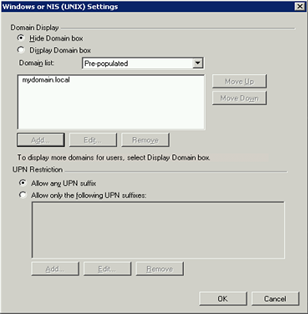 .
.
In the desktop session, on the other hand, the online plug-in is used with pass-through. By default, the server uses "mydomain" for login, not "mydomain.local"!
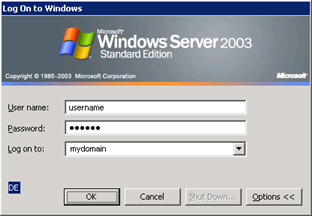
If an application is now launched via the online plug-in, the session sharing key is not the same as the one used for the desktop session. As a result, the application opens a new session for the user, the login process is repeated, the user’s profile is loaded again, and so on. This causes a lot of problems.
The same thing happens when the Web Interface and the Online Plug-In are used simultaneously on a workstation. The approach here is to use the Web Interface (the website) to display additional messages, information, etc. However, this also requires the Online Plug-In for content redirection.
What isn't so obvious but is actually „tricky“ is that the Web Interface page and the service might generate different session sharing keys even when everything else is the same! Oops, a „bug“ in the Web Interface that I noticed in version 4.6. I hope this has already been fixed in the current Web Interface version 5.2.
How do I get the same session sharing key?
First, make sure that the web interface and the server/workstation use the same domain format (NetBIOS or UPN). For servers/workstations, you can use a Microsoft Group Policy and/or set an ICA client registry value, as described in the article CTX368624 described, .
If the sharing key still does not match, a troubleshooting process is necessary, which I will explain next.
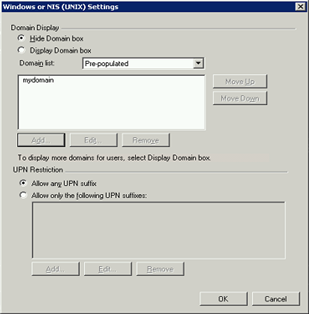
Error Analysis of the Session Sharing Key
The session sharing key with the hash value is of no use at all, so it must first be disabled. To do this, simply use the Windows search function (F3), but first make sure that ALL files are included in the search. Then search the Web Interface directory for the string „SessionSharingKey“. With Web Interface 5.2, the results are two files, „Include.java“ and „LaunchShared.java,“ although the first file doesn’t contain anything particularly useful. In LaunchShared.java, however, you can quickly find the following two lines:
// Put the encrypted hash in the ICA file, if we were able to create one successfully.icaFile.setValue(ICAFile.SECTION_APPLICATION, ICAFile.VALNAME_SESSIONSHARING_KEY, sessionSharingKeyHash);
If „//“ is placed before the second line, this disables the „hash“ on the session sharing key and results in an even longer string:
SessionsharingKey=8-basic-none-mydomain-user-farm-Off-Off–On-On
Translated to: colors + „-“ + encrypt + „-“ + audio + „-“ + domain + „-“ + user + „-“ + farm + „-“ + specialFolderRedirection + „-“ + virtualComPortEmulation + „-“ + comPortMapping + „-“ + clientPrinterPortMapping + „-“ + clientPrinterSpooling
When comparing settings, you might find that an option is set to "Off" where it should be "On," or vice versa. The first parameters are easy to manage (application and domain properties), but what about the rest? Simply add the required value to the Default.ica file for the web interface or service. The values for the ICA file can be found in the INI File Reference CTX107919 can be looked up.
For example: If „comPortMapping“ should be set to "On," add the value COMAllowed=On to the [wfclient] section.
Summary
The session sharing key is very important and should be used in conjunction with the Web Interface and the online plug-in. Be sure to use the same authentication format (NetBIOS, UPN) for both the Web Interface and the server/workstation. Due to a Web Interface bug, it may be necessary to perform a troubleshooting analysis.
If the session sharing key is mismatched, sessions cannot be shared. If this happens, multiple sessions are used for the same user, resulting in multiple logins to servers, multiple profile loads, unnecessary consumption of server resources, and much more. Therefore, make sure that the Session Sharing Key is under your control—is that the case? Let me know!


 German
  English