

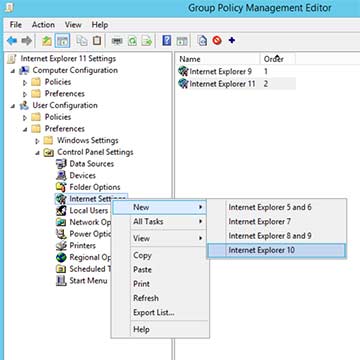
MIn Internet Explorer 11 and later, the group policies must Control Panel settings with the Internet settings can be used. In previous versions, Internet Explorer Maintenance could be used, but it caused some problems, which is why Microsoft has completely discontinued it. Instead, you must use Internet Options; here are a few tips on what to look out for.
The first surprise might be that they don't have an option for Internet Explorer 11
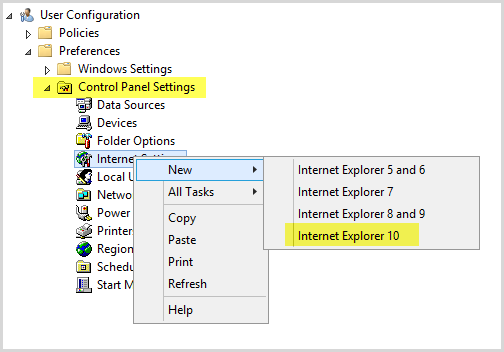
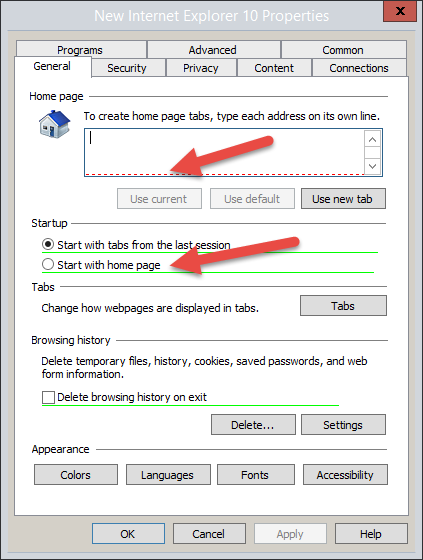
But don't worry, Internet Explorer (IE) 10 works for IE versions up to 999. After creating a new entry, you can change it to Internet Explorer 11 or whatever version you prefer. Then, hopefully, the familiar Internet Explorer Properties dialog box will appear, where you can adjust the settings.
 |
|
|
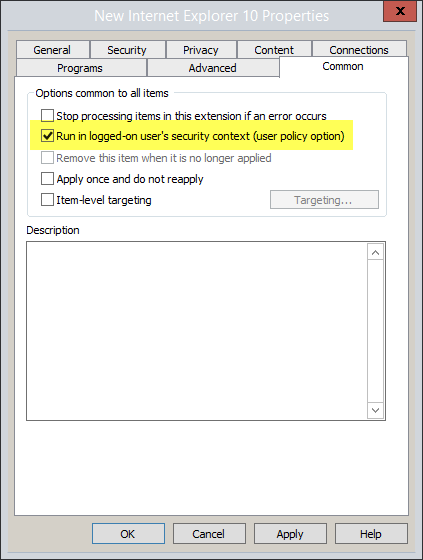 |
Make sure that the policy is applied in the user's security context, which is not the default—but should be. There's a story behind this setting. If the setting is applied in the user context, you'll see entries in the event log stating that the policy couldn't be applied due to permission issues. Nevertheless, the policy is applied! If you choose NOT to apply the policy in the user context, you will no longer see any entries in the event log. Great, you might think, BUT… As a result, some Internet Explorer entries in the user registry are inaccessible to the user. This then causes, for example, Internet Explorer's built-in authentication to stop working.
Therefore, I recommend ignoring the events in the event log!
|

 German
  English
I tried this with IE11, following the instructions under „Control Panel Settings / Internet Options“ (User Settings), where I set a home page and made certain other adjustments. When I open Internet Explorer via Citrix Receiver, I see absolutely none of the settings I configured—neither my defined home page nor the Trusted Sites and Zones settings.
It looks as though the policy is being applied, but the settings still aren't taking effect. My goal was actually to enforce certain IE settings, regardless of whether the user’s TSE/Citrix profile happens to be deleted, and even if they already have a profile, so that my settings take effect immediately.
Without seeing the details, I can only offer general advice.
1. Run the Group Policy Results Set in GPO Management and check what is being applied to the user.
2. For RDSH/XA/XD, it is recommended that you enable loopback processing of Group Policy in Replace mode.