


WWhy bother with SMS when everyone has a smartphone these days? The thing is, a new employee gets a new phone, and it isn’t configured at all. Plus, we don’t necessarily want them to use their existing email client. All we know, however, is the phone number—nothing more. This means email isn’t an option, leaving only SMS as a way to register (onboard) with XenMobile. I haven’t yet seen a company with its own SMS gateway. This is exactly where email-to-SMS comes in as a quick and easy solution.
Here's how to do it in a few simple steps:
- Make sure your provider offers an „email-to-SMS“ service. I use textlocal.co.uk and first had to activate the service and set up an email alias (specifying which email address is allowed as the sender).
- However, configure the notification server very important with authentication for a user. This is necessary because otherwise they would attempt to send unauthenticated emails externally and would be blocked by the mail server (otherwise, you would need to set up an additional connector on the mail server). If you attempt this without authentication, you will see the following error in the XenMobile debug log:
Exception: 550 5.7.1 Unable to relay. - Make sure that users in Active Directory have a phone number, or add a mobile number under the Phone tab. The corresponding AD objects would be either
user.phoneNumberoruser.mobileHowever, in both cases, the number must not contain any special characters or spaces, and the country code must not include a plus (+) sign. +49-123-456-789 is incorrect, but 0049123456789 is correct.
- You should create new notification templates (there is no copy or duplicate function), for example, for download links, enrollment invitations, and enrollment PINs.
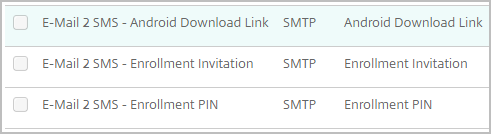
When doing so, set the Recipient, Here is my example, on ${user.mobile}@txtlocal.co.uk. Don't forget to copy the content of the remaining fields from the existing templates!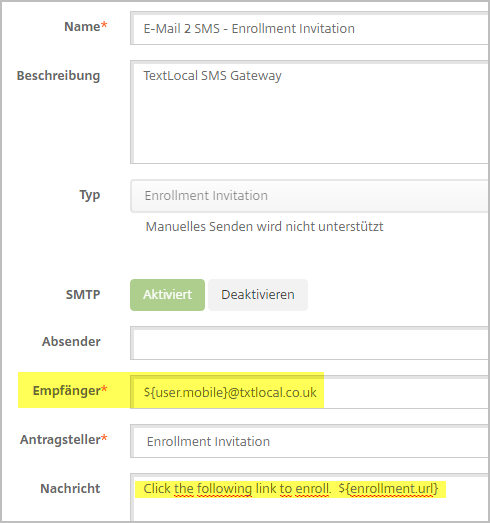
Error analysis:
- Send a test email from your email client to your provider to test the SMS conversion.
- Check the XenMobile debug log for relay issues and to ensure that the mobile number is being retrieved correctly from Active Directory.
- Enable email tracking on the mail server to verify that emails are being sent correctly.
- The text provider should maintain a history of received and sent messages and should review them.

 German
  English