IIn a specific situation—though not necessarily an unusual one—the following error message may appear in Citrix Receiver for Android: „An error occurred while connecting. Please check the server address and your internet connection..“
Before I address my specific issue with the error, you should review the following Citrix articles:
- Receiver for Android Connects to the Default StoreFront WebUI
http://support.citrix.com/article/CTX216410 - Android receivers unable to list apps after upgrading the NS firmware to 11.0
http://support.citrix.com/article/CTX206478
Here is the environment with its key components
- Citrix NetScaler 11.0
- Citrix NetScaler Load Balancing for StoreFront Servers
- Citrix StoreFront 3.5
- Citrix Receiver for Android
Let's take a look at the problem
Please note that other devices (iOS) do not encounter this error and function normally.
First, check the StoreFront event log to see if there are any requests to the authentication service via the loopback address 127.0.0.1. Later, I discovered that this happened after the browser on the Android device was used to start the session. After that, I looked at the Receiver log and found the following: „Authentication error: Unable to respond to any of these challenges“ as a response from StoreFront.
Something is clearly wrong with StoreFront, especially because of the loopback request. Now, you could waste a lot of time trying to „dig into“ StoreFront or simply perform a fresh installation of the latest StoreFront version 3.7. The latter solved the loopback problem, but Android devices were still unable to connect and continued to receive the same error message.
After further investigation, I discovered that the source of the problem was the persistence setting „COOKIE NOTICE for load balancing. However, this is the official setting for StoreFront load balancing, as documented by Citrix https://docs.citrix.com/en-us/storefront/3/integrate-with-netscaler-and-netscaler-gateway/load-balancing-with-netscaler.html but it is actually problematic with Android devices.
Solution
The solution is to set the load balancing persistence to „SOURCEIP“and on top of that, I also had to handle the X-FORWARDED-FOR Option set.
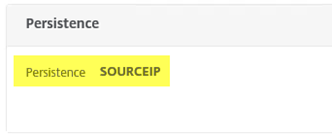
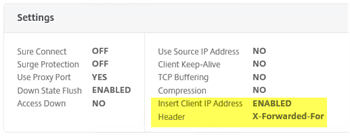
After that, all devices were able to connect successfully via: Netscaler Gateway -> Virtual Load Balancing -> To the StoreFront Server in order to finally obtain the application set and successfully establish ICA connections. By the way, a connection created manually in the receiver had already been working previously.