

CCitrix has released XenDesktop/XenApp 7.12, introducing several features that have long been part of the IMA architecture; that is, up to XenApp 6.5. If you’ve been working with XenApp 6.5 or earlier versions for some time, you’ll be happy to hear that these features are back—or at least something quite similar.
Here are a few things (not all of them) that I think are worth mentioning.
What's new in XenDesktop 7.12
High Availability (HA) with Local Host Cache (LHC)
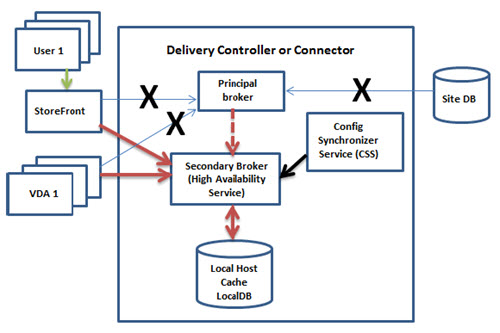
LHC is back! Ever since XenDesktop 7 was released, Citrix CTPs and others have been constantly asking for the missing LHC functionality. Citrix later released „Connection Lease,“ but it was a pale substitute compared to LHC. This is now the „first attempt“ of the LHC in XenDesktop 7.12; implemented as a Windows high-availability service. Citrix uses „NT Service“ accounts, which have caused problems in the past (see VDA Upgrade Issues). The known issues listed below already include problems with the HA Windows service, which is why I'm calling this the LHC's „first attempt.“.
How LHC Works in a Nutshell: A new Windows service, the Configuration Synchronizer, synchronizes data with the HA service whenever changes are made, and the HA service stores this information in LHC—a local database. If the site’s database is unavailable, the primary broker activates the secondary broker (HA service) and takes over the requests. Once the site’s database is available again, it switches back to the primary broker—actually quite simple.
Tag restrictions with application groups and desktops
That sounds like an interesting way to get back something that XenApp admins always look for in XenDesktop. How can I make a single application or desktop available from just one machine in a delivery group? Until now, this required creating additional machine catalogs and delivery groups and then moving the relevant machine to them. Now, tags can be set to restrict a machine catalog and/or deployment group. In other words, you can further subdivide a catalog or group. Here is the official Citrix description:
„Using a tag restriction allows you to use your existing machines for more than one publishing task, saving on the costs associated with deploying and managing additional machines.". Using a tag restriction is similar to subdividing (or partitioning) the machines in a Delivery Group. You can also use a tag restriction to help isolate and troubleshoot a subset of machines in a Delivery Group.“
HDX Enlightened Data Transport (for testing purposes only)
This is another test for customers, designed, I believe, to gather feedback from real-world operations and determine whether we are heading in the right direction. The new HDX data transport layer was designed for long-distance WAN (transatlantic) and Internet connections. The new transport layer uses UDP to handle data throughput for all virtual ICA channels, including ThinWire (remote display), client drives, printing, multimedia redirection, and others. HDX Enlightened Data Transport should only be used for testing purposes and is enabled by a new Citrix policy, with a fallback to TCP. This new HDX feature requires Receiver for Windows 4.6 or Receiver for MAC 13.5
NetScaler Gateway High Availability (HA) supports Framehawk
Framehawk is slowly gaining traction with customers, and it’s about time that this is also being implemented by a couple of Netscalers operating in a high-availability (HA) cluster.
Different restart times for machines in deployment groups
Finally, we no longer have to restart the entire provisioning group at the same time—something we really need, especially in large environments. Now, different restart times can be scheduled within the deployment group. I just wonder why this wasn’t included in the first release? Citrix claims to operate its own 1,000-server farm—do they never have to restart the servers, or did they use something else?
Expanded historical data availability with the Enterprise Edition
Enterprise customers have long been able to access a longer period of historical data in the Director, and now up to 31 days.
XenApp and XenDesktop 7.12 contains the following known issues
NOTE: This is just a selection of issues I have chosen!
- Upgrading a Delivery Controller may fail with the following error code: XenDesktopSetup: Process completed with
Error 1603. Additional messages indicate that Broker_Service_x64.msi failed to install. If this happens, force
Stop the Citrix Broker Service (or terminate the service if stopping it does not work), and then retry the Controller
upgrade. - On Windows 7 machines, the VDAWorkstationCoreSetup VDA installer creates system restore points for
every ICAWS driver. This can add up to 15 minutes to the VDA installation. As a workaround, disable the
Windows System Restore feature (Control Panel > System > System Protection > Configure > Restore)
settings, select „Turn off system protection“). - On Windows 7, the VDAWorkstationCoreSetup The VDA installer may fail with error ID XDMI:DD9A87F1
(installing the IcaWS_x86.msi file). Workaround: Run the VDA cleanup tool (CTX209255) and then retry the
installation. - When using the full-product installer’s graphical interface to install a VDA on a physical machine, the
Features page option to enable the Framehawk port is not available. Workaround: After installing the VDA,
run the command
„[Install Directory]ICAConfigToolIcaConfigConsole.exe /ExecutionMode:configure"
“/ENABLE_FRAMEHAWK_PORT:TRUE" - When logging on or off on a Windows 10 or Windows Server 2016 machine, the operation may pause and
seem to be stuck. Click in the session window to resume the operation. - When Local Host Cache is enabled, users with desktop connections may be unable to reconnect to the
desktop during an outage. If this happens, restart the Citrix High Availability Service.
Information about the next Long-Term Service Release (LTSR)
The following platforms are no longer supported according to the next LTSR:
- VDAs on Windows 8.1 and earlier versions of Windows Desktop.
- VDAs on Windows Server 2008 R2 and earlier versions of Windows Server.
- XenDesktop 5.6 works with Windows XP
The following features are no longer supported according to the next LTSR:
- Connection leasing (Replaced by LHC)
- Legacy Thinwire mode (This mode is intended for operating systems that are no longer supported)
- Desktop Composition Redirection (DCR)
 German
  English