
LSlow logins are already a problem; if they take longer than a certain amount of time, it can lead to face serious problems, provided that only published applications are used.
The situation could get even worse if the Citrix User Profile Manager (UPM) auto-configuration has not been disabled. Automatic configuration forces profile streaming and can lead to file corruption if there are a large number of small files, such as INI files, cookies, bookmarks, and others.
What issues are we talking about here?
- Initially released applications do not start.
- Multiple applications are opened simultaneously on different servers
- User profiles are loaded multiple times because applications are opened on different servers
- Even longer wait for end users to start using the desired application
- File corruption caused by profile streaming and an extremely large number of small files (thousands) and/or very large profiles (hundreds of megabytes)
As explained below, certain issues can be mitigated through configuration, but ultimately, the goal is to develop a profile strategy and finally begin managing user profiles. Unfortunately, I find far too often that customers have simply enabled UPM and are then just hoping for the best.
The threshold is approximately 40–60 seconds to log in, ...when things can get really bad. First, the application fails to launch and is terminated prematurely. The following Citrix registry key can help with this ApplicationLaunchWaitTimeout (in milliseconds) ( https://support.citrix.com/article/CTX128009 ) to fix the problem.
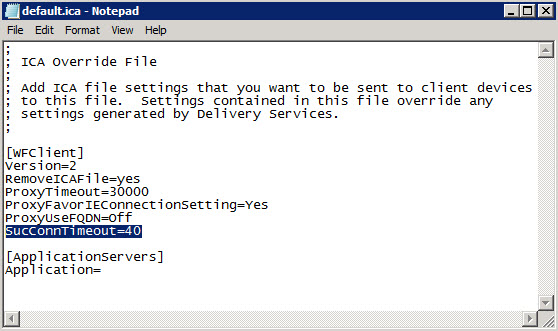
What follows—though often unnoticed at first—is that applications are opened on different servers. The reason for this is that the Receiver suppresses further launches for only 20 seconds before they are started. So if multiple applications are „clicked“ in succession, this creates a „queue“ that is held back for 20 seconds, but after that, all of them are launched. If no session has been established by then, session sharing will not work either. The 20-second delay can be increased in the default.ica file by adding SucConnTimeout=40 (https://docs.citrix.com/content/dam/docs/en-us/receiver/windows/ica-settings/en.ica-settings.ica-settings-wrapper.pdf )
If that were to happen now as well File corruption If you come, be sure to check out the automatic configuration Disable UPM (it should be disabled by default, but in some versions there is a bug that enables it instead of disabling it). If this policy is set, it may have a significant impact on the profile if user profiles have not been properly managed up to this point.
Actually getting started with profile management in production can be a real headache! So don't just hope for the best—start planning and designing your profile management system right away!
Profile Management includes
- Citrix User Profile Manager Settings
- Application Behavior and Data Redirection
- Folder Redirection
- Monitoring the Profile Store
- Working with the Store, CleanUp (ProfileNurse, Citrix WEM)
- Optimizing the profiles during and after the pilot phase
NOTE: This actually happened to a customer, and it took more than two weeks to fix it in the production environment!