


KRecently, one of my clients gave me a problem to solve: „Can we authenticate with the Netscaler Gateway using only a username and security token, from a not a domain member and then access to a full Have you received a Citrix ICA session?„
This is exactly where the Citrix Federated Authentication Service To the rescue!
The customer wants employees to be able to work without passwords, which is why the company uses only smart cards with all domain members. The company devices have no problem accessing the internal network from outside the company. But what about personal devices? In this case, users receive a security token and nothing else. In the past, users had to enter their password at least once in the web interface and then save it.
In my opinion, this is a good example, and I believe that other Citrix customers have the same or similar requirements. Before I get back to the use cases, let’s first take a look at how the Citrix Federated Authentication Service throw.
Citrix Federated Authentication Service
To make things easier to understand, I'll keep the explanations simple. FAS is a Windows service that Smart Card Class Certificates (vSmartCards) on behalf of the Active Directory user. To do this, the service must be authorized by your own internal private certificate authority (CA). The Federated Authentication Service primarily interacts with Citrix StoreFront, although other components such as Netscaler, DDC, and VDA are also involved but are not as critical. The created vSmartCard is then sent to the target VDA server, just as the NFuse ticket was previously. Since FAS holds all private keys for the created user vSmartCards, the system must be secured with restricted access, even for administrators.
FAS Setup
FAS has been part of XenApp/XenDesktop Media since version 7.9. Deploying FAS is easy, especially if you have full administrative rights to the private CA. Citrix recommends not using a server on top of another Citrix Components are installed, or another server on the one that already Port 80 is used For example, IIS. Simply run the setup, which installs a Windows service and a console. Be sure to run the FAS console as an administrator (using runas); otherwise, further configuration will fail. Three tasks must be completed to finish the setup:
- Upload (Import) Certificate Templates to the Private CA
- Add the templates to the CA and
- Authorization of the FAS server to issue certificates, which must be approved on the CA server.
1 and 2 are done via remote PowerShell and shouldn't be a problem.
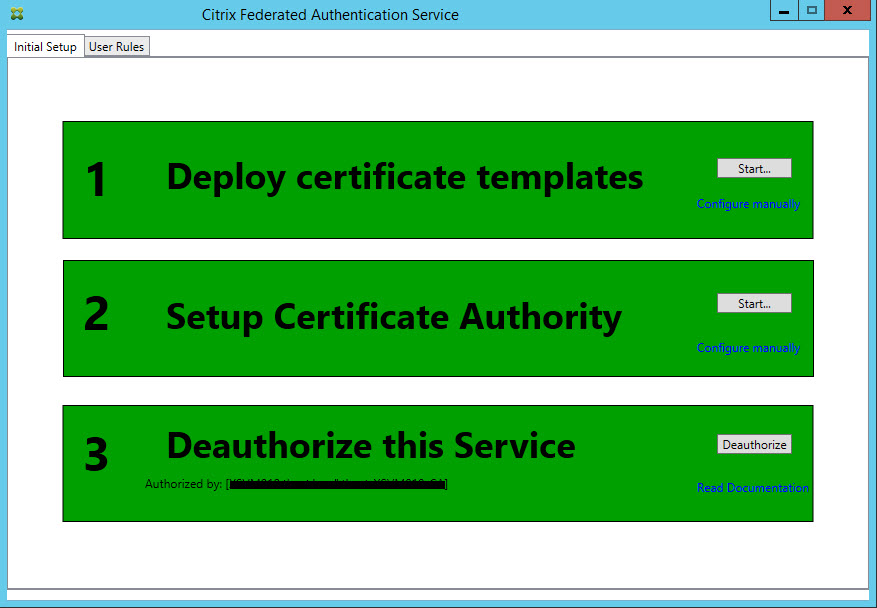
If all tasks are „Green,“ a Microsoft Group Policy must be configured to define the FQDN and session settings of the FAS server. The policy must then be assigned to the VDA, DDC, and the FAS server itself. The configuration will not proceed until the policy has taken effect. If the system does not have the policy, the following will appear in the event log: No User Credential Service has been configured. Apply the "Citrix User Credential Service Group" Policy Object
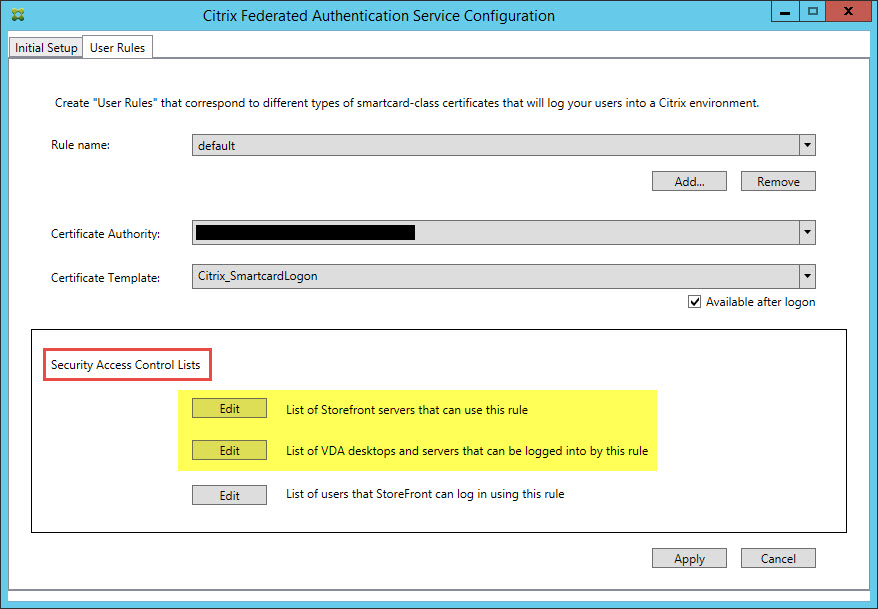
User Rules / ACL
The main task is to configure the Security Access Control List (ACL). By default, all computers are allowed access to StoreFront and VDAs prohibited. All computers involved must be added to the „allowed“ list, and anything that is blocked must be removed. That's all there is to it.
FAS Configuration
This is the tricky part, since not everything is currently documented, let alone for every possible scenario. The basic concept and architecture for some cases can be found in the Citrix eDocs (https://docs.citrix.com/en-us/xenapp-and-xendesktop/7-14/secure/federated-authentication-service/fas-architectures.html), such as using ADFS for a B2B solution, etc., but no specific details on how to configure these, neither for Netscaler nor StoreFront. There is only one thing that is certain: Users must be familiar with the User Principal Name (UPN) Please log in; otherwise, FAS will not be able to issue vSmartCards.
StoreFront FAS Plug-in
Currently, FAS cannot be enabled in the StoreFront console and must be configured via PowerShell. I recommend creating a separate store named „FAS“ for this purpose. The PoSh commands then use the path Citrix/FASAuth. This modifies the web.conf file in the folder and is also replicated in a StoreFront cluster. Here are the PoSh commands for a store named „FAS“:
& “$Env:PROGRAMFILES\Citrix\Receiver StoreFront\Scripts\ImportModules.ps1”
$siteId = 1$storeVirtualPath = “/Citrix/FAS”$authenticationVirtualPath = “/Citrix/FASAuth”
# Use FASSet-DSClaimFactoryName –siteId $siteId –virtualPath $authenticationVirtualPath –factoryName “FASClaimsFactory”Set-DSVdaLogonDataProviderName –SiteId $siteId –VirtualPath $storeVirtualPath –VdaLogonDataProviderName “FASLogonDataProvider”
FAS Use Cases
There are many different scenarios possible, some of which can become quite complex, but ultimately, all of them involve accessing a full Citrix ICA/HDX session. This brings me back to the beginning of the article, though not necessarily to the first use case.
What I see as the first use case for FAS is simply Domain Pass-Through with StoreFront. If domain pass-through is enabled in StoreFront, it applies only to the Web Receiver (RfW) but not to the target VDA server. To make this work, the local receiver must be installed with administrator privileges so that SSO can be registered. Then SSO must still be configured via GPO, and in the end it doesn’t work anyway because additional „credential providers“ that were loaded prevent the feature from functioning. All in all, it’s not exactly simple or error-free.
With FAS, you can simply forget about the SSO part of the receiver! No admin installation, no receiver configuration for SSO! Don't forget: this requires a client in the domain, and RfW must be in the Intranet zone in Internet Explorer.
Back to the „Token Only“ use case, a good example of FAS. Let’s assume that all employees in the company use smart cards and do not know their Active Directory password. When employees work from home and do not use a company-issued device, How can they authenticate themselves without a password?? Token authentication using a UPN as the username is all that is required with FAS. This allows employees to work securely—without a password—both inside and outside the company.
FAS Improvements
Citrix will and should continue to develop FAS, and by that I don’t just mean FAS itself, but more importantly its integration with StoreFront and Netscaler. StoreFront needs better front-end error messages (simply saying „request cannot be completed“ isn’t helpful), and FAS should be included as an authentication option in the console. Netscaler should include FAS options for SSO in the session profiles. FAS itself should get a “facelift” for the console, along with better error messages, tracing, and logging functionality.
That said, FAS is very stable and easy to configure. Identity management is becoming increasingly important, and FAS serves as a bridge to enable users to access an HDX session.
My thanks go to Andrew Innes (FAS) and his team, as well as to Simon Frost (StoreFront)

 German
  English