


SHave you ever heard of context switches? If so, it’s probably because you’re an administrator for a Citrix Presentation Server farm. This isn’t a problem specific to Citrix, but context switches are among the standard metrics monitored by Citrix Resource Manager and apparently trigger alerts quite frequently.
Other systems may also have issues with context switching, but without monitoring, no one will notice.
Understanding changes in context
I won't go into too much detail here; this description is simply meant to explain the basics of context switching in a straightforward way.
Processes consist of so-called „threads“ that perform the actual work. Threads are scheduled and executed on the system CPU (on a single CPU, not on all CPUs in the system), and only one thread can be executed per CPU at a time. In addition, a process can have multiple threads. The specified duration of execution is called a „quantum,“ but this does not mean that a thread is necessarily allowed to use the entire quantum, nor that the thread’s work is finished once the quantum has elapsed. However, when the quantum ends, a context switch to the next scheduled thread is performed (this is just one reason for a context switch; premature termination is also a context switch).
If the performance counter for context switches (per second) shows a high value, it means that threads have less time to do their work, which can cause the performance of the entire system to decline.
Two other definitions of context switching:
Microsoft
„The average number of times per second that the processor switches context between threads. A high rate indicates that many threads are competing for processor time.“
Windows Internals
„Context switch refers to the process in which the temporary processor state of the active thread is saved, the temporary processor state of another thread is loaded, and execution of the new thread is started.“
Reason for high context-switching rates
Often, the problem is caused by a swap file that is too small or one that cannot grow dynamically. Another possible cause is the write cache of the (RAID) controller, which can be managed using the Microsoft utility (or the manufacturer's tool). dskcache can be adjusted. High active rates can also be caused by inefficient hardware or poorly programmed applications.
Troubleshooting issues with context switches
As is often the case, there are various ways to identify and resolve the issue, but the main goal is to pinpoint the process that is causing a high rate of context switching. It is important to note that better hardware may be required.
How can you determine the current value of context switches for the system? The answer can be found using Microsoft’s Performance Monitors (perfmon.msc) under System/Context Switches or Threads/Context Switches. If you look at context switches based on threads in Performance Monitor, you’ll find that it’s not easy to identify the process with high rates.
Sysinternals is much better in this regard Process Explorer (free of charge). By default, however, Process Explorer does not display context switches and must first be enabled.
You can do this by going to View | Select Columns | Process Performance | and enabling "Context Switches" and "Context Switch Delta"
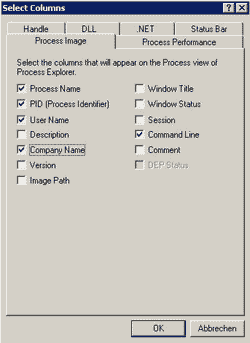
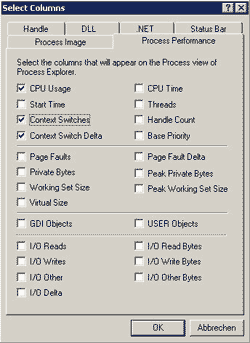
Both values should now be visible for each process in the main window of Process Explorer. The Context Switches column shows the total number of switches since the system started. Sort this column by the highest value and look for a) high values and b) rapidly increasing values. Both are good indicators of processes with high context switches.
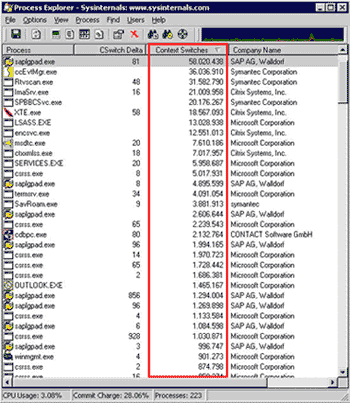 |
| Process Explorer – Context Switches Column |
Next, check the CSwitch Delta column, as it displays the number of context switches per update interval in Process Explorer (with an „update speed“ of 1 second, this represents the number of context switches per second). If the process was found, you should investigate why it has such a high number of context switches.
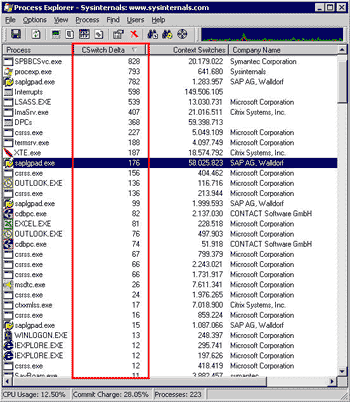 |
| Process Explorer – CSwitches Deltas Column |
Values for „poor“ context switching
The default value for the „Red Alert“ context switch in Citrix Resource Manager is 14,000, but this applies to a single CPU. The value is per processor, so with two CPUs the value should be 28,000, with three CPUs 42,000, and for a quad-CPU system 56,000. These are still just baseline values, and to obtain an accurate value, the system must be monitored over a certain period of time.
At BriForum 2006 EU, I spoke with Tim Mangan We talked, and he said that context shifts shouldn't be given too much attention.
References
-
Sysinternals Process Explorer
http://technet.microsoft.com/sysinternals/bb896653.aspx


 German
  English