PThere are now many PowerShell scripts for Microsoft Teams that set various options, such as GPU settings, and many that configure Teams to be used as a chat app. So it seems simple, but unfortunately it isn't, because the scripts follow a set formula and that won't work with the Chat App Feature! When migrating from Skype, Teams' instant messaging (IM) integration is important—for example, to see in Microsoft Office whether someone is available or not. To make things easier for users and/or the help desk, this option should be set during sign-in using a PowerShell script, but how?
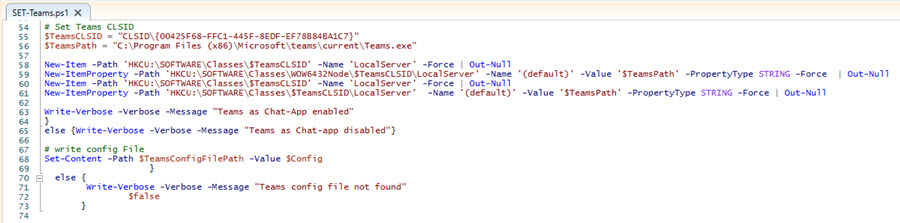
It took a long time to identify and analyze the problem, but eventually a tip found online led to the solution. In addition to adjusting the setting in the desktop-config.json file Additional registry values must be set. The Teams Chat App setting will only work if both steps have been completed. The following lines are required in PowerShell:
Otherwise, the usual PowerShell scripts are used for this. If you'd like a copy of my script, just send me a quick email.