MIn Office 365, Outlook isn't set as the default email client. What sounds like a simple problem turns into a long search, with a the surprising twist at the end. The issue is caused by Adobe Acrobat Reader and the feature that allows you to send PDFs via the default email client. Using this feature results in an error stating that no default email client is available. The default client is set under HKLM\SOFTWARE\Clients\Mail specified, but precisely this The entry disappears after closing Outlook!
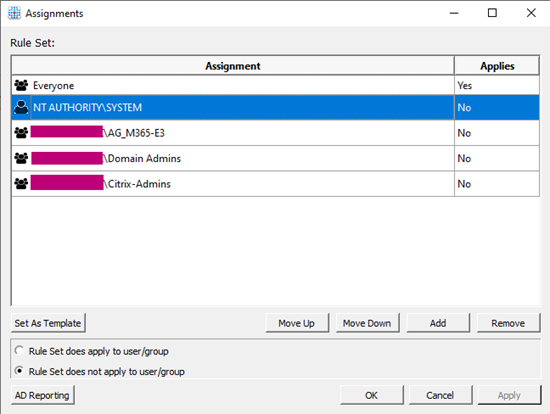
The first question is whether Outlook is actually responsible, which is why we're using the Procmon program. This reveals the true culprit, which is the process OfficeClickToRun.exe! What exactly this process is for isn't entirely clear. Installing and updating Office often leads to an "etc.," but what exactly is this "etc."? Well, it's due to an Office component, and as is often the case, it might be related to permissions or policies—though that was quickly ruled out. However, when testing on the master target, the problem doesn’t occur, leading to the classic question: what’s different? With this information, it could still be a component—specifically, the FSLogix rules for Microsoft Office—and that turned out to be the exact cause. Although the permissions for the users were correct, the System user was missing—and it is precisely under this user that the Microsoft Office Click-to-Run service runs. Add the System user, and the problem is fixed. This allowed the service to access the user’s license.
But the question is, why does the Office Click-to-Run service remove Outlook as the default email client? If Outlook or all Office programs were to stop working because the service can’t access the license, that would be understandable, but why remove only the default email client? That’s a mystery that only Microsoft could clarify.