


DThis article discusses Citrix Cloud Network Locations Services (NLS) and explains why, at Citrix, „Undefined“The new one is external. Anyone looking at the network locations might get confused, since the wording might not be entirely accurate—at least for me.”.
Why do I say that “undefined” is the new “external”? Let’s clear that up right away: In the NLS settings, I can define “internal” and “external”—for example, my headquarters as “internal” and my branch office, which isn’t connected to the network, as “external.” Technically speaking, these are two fixed IP addresses and, in most cases, the firewall through which communication with the outside world takes place. All others tens of millions of IP addresses Are they then undefined and not external? Yes, but that is exactly how it works with Citrix Network Location Services, and it makes perfect sense when viewed from a definitional perspective. We define the IP addresses we know—that is, those that are known to us—and so everything else is undefined, which is only logical.
It could also be described as follows:
Internal = Direct access between Citrix WorkspaceApp and Citrix VDA
Client -> VDA
External = Indirect access (Gateway Service) between Citrix WorkspaceApp and Citrix VDA, of known origin.
Corporate Client -> Gateway Service -> VDA
Undefined = Indirect access (Gateway Service) between Citrix WorkspaceApp and Citrix VDA, of unknown origin.
All unknown clients -> Gateway Service -> VDA
With these three definitions, there are also three Standard tags: LOCATION_internal, LOCATION_external and LOCATION_undefined. These tags can then be used in various places.
Here is an example of configured network locations:
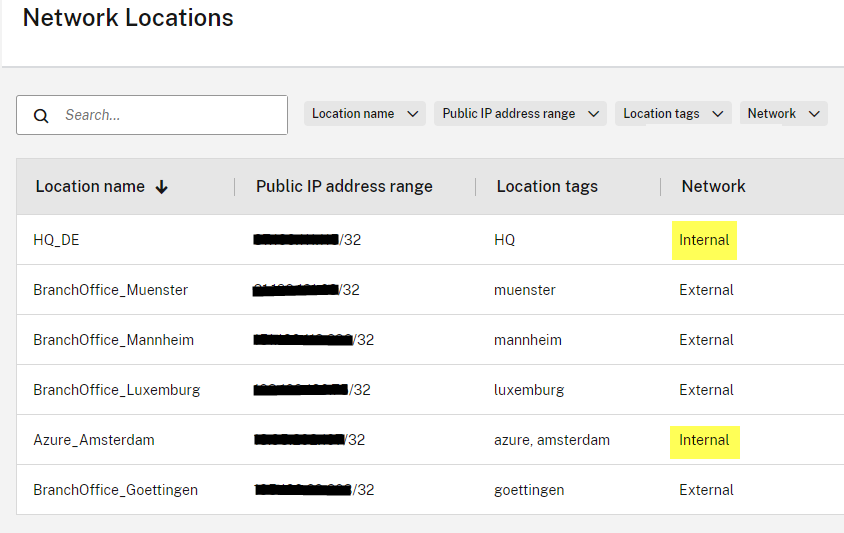
The tags are broken down as follows
LOCATION_internal = HQ_DE and Azure_Amsterdam
LOCATION_external = BranchOffice_muenster, BranchOffice_mannheim, BranchOffice_luxemburg, and BranchOffice_goettingen
LOCATION_undefined = Everything else.
We can then use these tags, for example, in Citrix policies; here is an example: all branch offices Assign a policy or prohibit all unknown (undefined) clients from connecting to the drive.
By adding location tags, separate policies can then be assigned, since the location Branch Office in Luxembourg or the location tag „Luxembourg“can only be used for the Luxembourg location, with LOCATION_TAG_luxembourg. This means, for example, that policies can be assigned on an individual basis.
Question: My company uses Zscaler and thus a cloud-based proxy to protect the company's clients—Zero Trust. This also turned internal clients into a LOCATION_undefined.
Answer: In this case, exceptions, bypasses, or whatever the solution calls them should be used. With the exception *.cloud.com That would be a start.

 German
  English