


RCustomers often tell me that they want to optimize Windows Server performance using a script they found online, which, among other things, makes some registry changes. In my opinion, this is not only dangerous but can also potentially cause problems down the line. Then a lot of time is spent analyzing the system to figure out what the issue might be. On the other hand, these same customers fail to optimize user sessions, thereby wasting server resources and creating potential sources of error.
Let me explain why you shouldn't worry about the server and should instead focus on user sessions.
Optimizing Server Performance
Why do we want to optimize server performance? Where does this come from? Back in the good old days, before virtualization really took off, each server ran on its own hardware. Every time an additional server was needed, new hardware had to be ordered, which incurred costs. As a result, everyone tried to get the most out of their hardware. It makes sense, but it’s still questionable whether that really made much of a difference back then.
These days, when I talk to customers, it’s not really about performance (well, there’s always that one customer…) or resources, but about risk management. We provide the hardware with sufficient bandwidth and resources, but what are you willing to lose if the hardware or a virtual machine fails? We have enough bandwidth, so why worry about the virtual machines? Do you really believe that tuning the virtual machines will allow you to add ten more users—or even just one? If you think so, is that just a hunch, or do you have evidence to back it up? How much time do you invest in optimization, and what do you get in return? There’s enough bandwidth available, so why not just provision an additional VM?
Be that as it may, in all my years working in IT, I’ve only encountered one instance where a registry key actually improved performance. That very specific situation involved Provisioning Server, Server 2000, and XenServer. Setting DisableTaskOffload noticeably improved performance, but wait! It wasn’t about performance at all—it simply eliminated network dropouts during streaming, which had nothing to do with the server’s performance! There are settings that can help with WAN connections, for example, but they should only be set in those specific cases. That, however, has nothing to do with performance either.
I would be extremely cautious about all the performance tuning tips, scripts, etc., that you come across. I wouldn’t use them. They can disable services, import registry values, etc., which might cause problems down the road. You might not remember what you did later on, which could mean you have to spend a long time searching for a solution to the problem.
That is why I recommend that you: Stop trying to optimize server performance!
Optimize user sessions
I find it kind of funny that so many people don't optimize their user sessions. Maybe it's because there aren't any ready-made scripts or tools for that? For me, this is a very important part of implementing new client environments. Just a few days ago, I conducted a review of an RDSH environment, and the user sessions had 10 unnecessary processes per user:
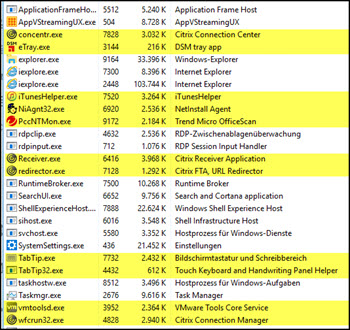
Typically, Virus Monitor, VMware Tools, and much more. A total of 20–25 MB per user and a small amount of CPU power, but many unnecessary processes that slow down the login process and may cause problems when logging out. That’s the calculation for a single user, and since we’re assuming 25 users per server, that would amount to a total of 250 unnecessary processes, 625 MB of RAM wasted, and a bit of CPU power also wasted.
Optimizing user sessions is a breeze. Often, all you need to do is clean up the RUN keys (32/64-bit). The best approach is simply to use Microsoft Autoruns Use that, and we've got the session's basic setup sorted!
What do you think? Do you believe that optimizing the servers will significantly improve performance? Do you optimize user sessions?
Please leave your comments below!


 German
  English