

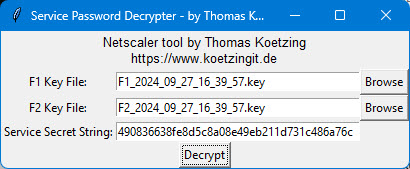
In this article, I present an NSKek tool I developed myself, featuring a user-friendly graphical user interface (GUI). This provides Netscaler administrators with an intuitive way to, Service passwords to decrypt securely without having to delve deeply into the technical details. This tool combines classic cryptographic methods – HMAC, AES-CBC and the dynamic derivative of a Key Encryption Keys (KEK).
In an age when data security and ease of use must go hand in hand, the targeted decryption of sensitive information plays an important role. The NSKek tool presented here offers an elegant solution: Not only does it allow service passwords to be decrypted, but it also provides a graphical interface that enables Netscaler administrators to easily select and process their key files.
What is Netscaler Credential Protection?
Netscaler Credential Protection takes a two-pronged approach:
- Recoverable service passwords: These are protected by reversible encryption (e.g., AES-256-CBC), with the KEK being dynamically derived from configuration files using an HMAC that combines two different key domains.
- Non-recoverable administrator passwords: These are secured using strong, one-way hashing algorithms (such as PBKDF2-HMAC-SHA256), making it impossible to recover the plaintext password.
This combination of dynamic key management and sophisticated password protection ensures that even if there is partial access to configurations, the actual login credentials remain secure. The central idea is that even if the internal processes are known, the system remains secure thanks to the secret, dynamically generated KEK.
A handy tool for decrypting service passwords
Building on these ideas, I developed a tool that can be used to decrypt sensitive service passwords.
Here is the key feature of the NSKek tool:
Key derivation using HMAC and file parsing
The NSKek tool uses two key files from the Netscaler—labeled F1 and F2—from each of which a specific section is extracted. Based on the byte segments (for example, from position 33 to 65 in F1 and 35 to 67 in F2), a key material is read in for each. Subsequently, using HMAC-SHA256 a dynamic Key Encryption Key (KEK) is generated. Using both key files, F1 and F2, along with the hash key, this tool enables even administrators without in-depth technical expertise to securely access their Netscaler service passwords.
Structure and Functionality of the Tool
As an example, let’s say we’re using a Radius load balancer and want to know what the service password is. There could be various reasons for this, such as checking whether the password meets the required complexity and complies with company policies, or simply because no one knows the password and it might still be in use in other systems. As previously explained, three components are required for decryption: the F1 and F2 Keys as well as the Hash, which the Radius load balancer uses. The keys can be found on the Netscaler under „nsconfig\keys“ or „nsconfig\keys\updated“And now all we need is the hash value. To find it, we look in the ns.conf after the load balancer and find, for example, the following:

So the hash value is: 00795842f27593df0e279e850cca4a4efc8a4353cc9188136ddd957227c90355 and the keys are F1_2023_10_16_05_41_44.key and F2_2023_10_16_05_41_44.key, If necessary, there should be multiple keys on the Netscaler. We use this information to configure the NSKek tool:
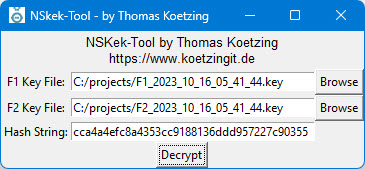
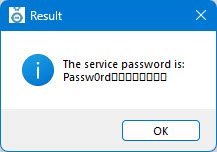
If all the values are correct, we receive the service password in plain text; additional characters may appear at the end, which is a known issue.
Download from GitHub
Conclusion
My NSKek tool for decrypting Netscaler service passwords is based on these best practices: It combines HMAC-based key derivation, AES decryption, and an intuitive GUI to provide Netscaler administrators with secure and easy-to-use access to sensitive data.

 German
  English