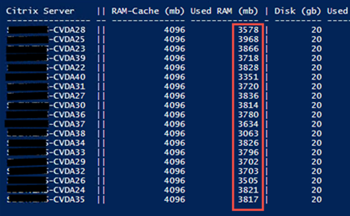
SSince Citrix Virtual Apps and Desktops version 1903 Is there a new driver for MCS that MCSIO v2. However, this new version is missing two important performance counters—„Cache memory used“ and „Cache disk used“—which are needed to read current values. In addition, the path to the performance counter has changed from \Citrix MCS Storage Driver on \Citrix MCS(*) changed. Unfortunately, it is no longer possible to determine the current cache disk size; instead, only the current size of the cache disk file (mcsdif.vhdx) can be determined. I have developed a PowerShell script that at least gives me a quick overview of the RAM and disk cache status.
The PowerShell script must be run on a Citrix Delivery Controller with administrator privileges. However, you must first set the MC parameter to the name of a machine catalog. After running the script, the following is displayed:
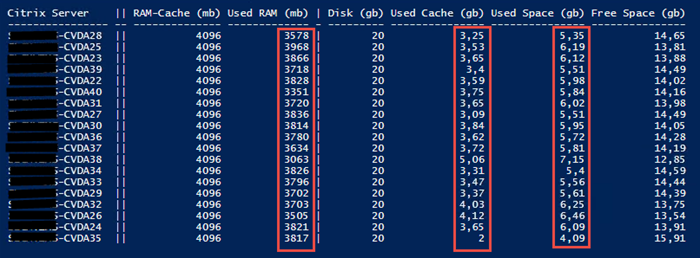
RAM cache = RAM cache size specified in the machine catalog (max.)
Used RAM = Currently used RAM cache
Disc = Disk cache size specified in the machine catalog (max.)
Used Cache = Disk cache used to a Point in Time X
Used Space = Total disk space used on the cache disk
Free Space = Total free space on the cache disk
Explanation
The CVDA28 server uses currently 3,578 MB of up to 4,096 MB of RAM cache. However, during the server's operation to date, an overflow to the cache disk was necessary, amounting to 3.25 GB. That is, at a Point in Time X a cache consisting of RAM and disk with a total size of 7.25 GB required. However, the disk cache is currently not in use, and only the RAM cache is being used.
Since the cache disk (mcsdif.vhdx) is a dynamic disk However, it does not automatically shrink (compact) to zero, but always retains its maximum value. In the image, the current value is No server cache disk and all of them operate solely from the RAM disk. Nevertheless, there came a point for all of these systems when the cache disk became necessary.
The drive containing the cache disk often contains additional data, such as redirected Event logs, WEM cache, FSLogix cache, page file, etc.. Therefore, the remaining free space on the drive is not the disk size minus the cache size. This is why there are also values for free space and used space.
Full script on GitHub
https://github.com/Koetzing/Powershell-Scripts/blob/main/vda-checkcache.ps1