

DThe Citrix NetScaler firmware update is complete, so my job as an administrator is done, right? Many people believe that a firmware upgrade all current security issues fixes, but that is not always correct. What else needs to be done, if anything, and what's the easiest way to do it?
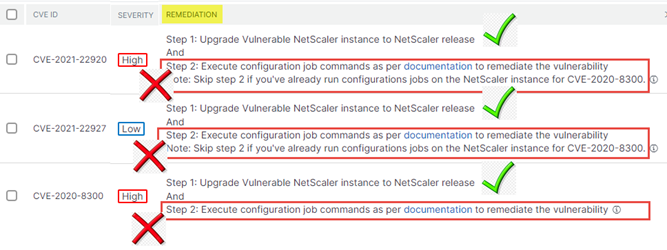
Yet another security issue with Citrix Netscaler—and a high-severity one at that! Quickly install the latest firmware update and everything is secure again—but that’s not the right approach! In addition to the actual firmware upgrade, additional configurations on the Netscaler are often necessary to provide a permanent fix for the security issue. How are you supposed to know when an additional configuration is needed? To find out, you have to read and follow the documentation for the relevant CVE—but who actually reads through the documentation?
Here is an example:
After the firmware upgrade, there are two additional Netscaler configurations that still need to be performed to resolve the security issues. The easiest way to do this is via the Netscaler Console (ADM) and the job workflow.
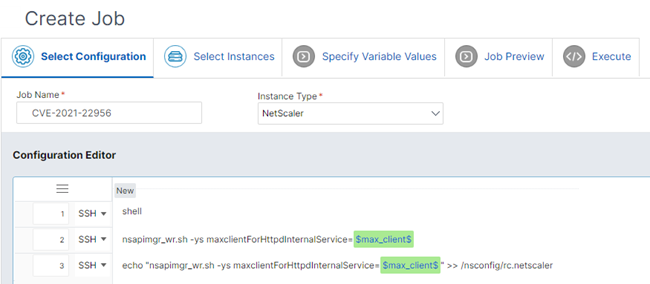
You may need to define parameters and send them to the Netscalers at the end. Under Infrastructure | Configuration | Configuration jobs You can then check to see if everything worked.
I know I'm repeating myself, but anyone who has a Netscaler in production should have added it to the Citrix Cloud Netscaler Console. For more on this, read my three-part article on Citrix Cloud Netscaler Console (formerly ADM)

 German
  English