


MMicrosoft Office 365 presents challenges for multi-user environments, whether using Microsoft Remote Desktop Services alone or in conjunction with Citrix XenApp/XenDesktop. The Exchange servers are hosted in the cloud, which means that the Outlook Cache Mode required. When cache mode is enabled, a OST file under AppData\Local\Microsoft\Outlook created, which can currently be up to 100 GB in size.
This leads to the following problems:
- The profiles are getting longer, which means the sign-up process is taking longer.
- First, the OST file must be extracted from
AppData\Localbe taken along. - Microsoft does not support redirecting the OST file to a network share.
- Redirecting works, but reading via SMB can be very slow.
In addition to cache mode, there is also the Search Index for Outlook, and the same issues arise here. But what solutions do Microsoft and Citrix offer for this in a multi-user environment? Since the release of Citrix User Profile Manager (UPM) Version 7.18 provides a solution for OST and SearchIndex.
The standard solution to this problem on the market involves the use of virtual drives, such as VHDX. Access to the OST file from a virtual drive occurs in blocks, which offers significant advantages. Microsoft has been doing this for quite some time with ProfileDisk and/or FSLogix, and Citrix has been addressing this starting with version UPM 7.18 and higher. With Microsoft, the entire profile can be moved to a VHDX, but with Citrix, this has so far only been possible for the OST file and the search index. Recently, additional folders can also be specified.
UPM Search Index Roaming for Outlook
Citrix uses this term to describe the feature mentioned earlier. However, I believe Outlook Cache Mode Roaming would be the better choice, and this might also explain why customers tend to overlook this feature. In fact, as a Citrix policy, only this one option needs to be set so that the OST file is written to a VHDX on the UPM storage share.
How does it work?
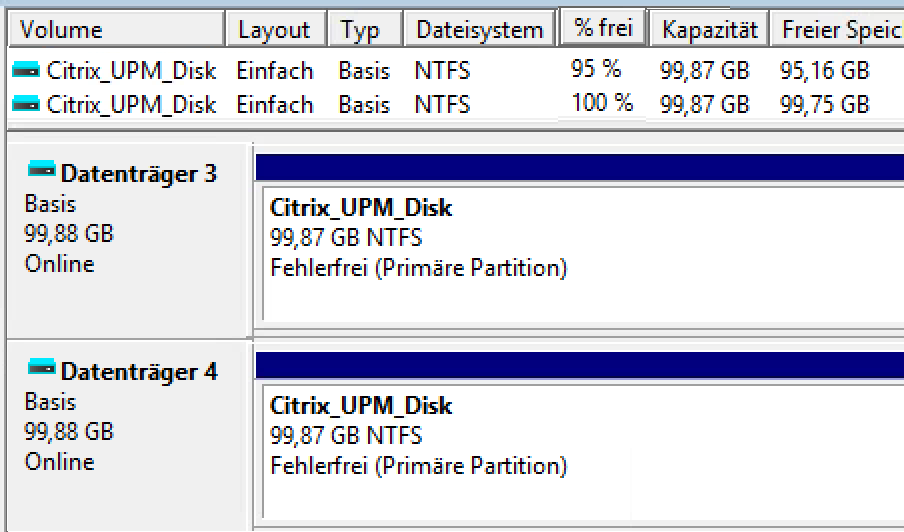
As soon as a user logs in, the UPM service generates two 100 MB VHDX files (dynamic up to 100 GB) is created in the user's share. During login, the local Microsoft account is managed via the Profile Manager Virtual Disk Service must specify the VHDX file with the path %UserProfile%\AppData\Local\Microsoft\Outlook to link to.

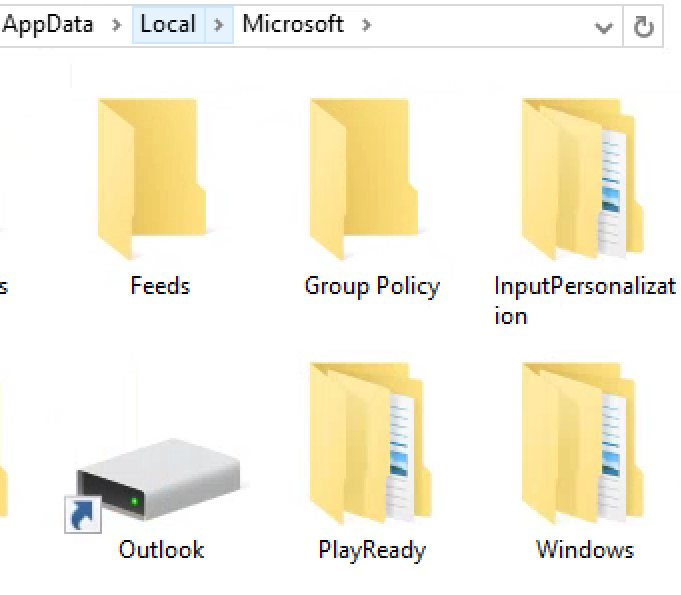
This can be clearly seen on the server, as the folder is displayed as a linked disk, and Disk Management shows the virtual hard disks (100 GB)—two per user.
What should you keep in mind?
Errors that occur when loading the disk via the Microsoft service are recorded in the administrative event log, not in the UPM log. The service seems to be somewhat sensitive to permissions, even though it runs in the system context. One of my clients had UPM permissions set only for Authenticated users entitled to and Everyone removed. This worked for administrative users, but not for regular users. After the reset, everything worked as expected.
Currently, there are issues linking the VHDX file to the directory via the User Profile Manager. Events 3005 and 3006 are associated with this, but they offer no help and do not explain what the problem is. Searching the UPM log is futile. Temporarily renaming the VHDX file and then recreating it has helped restore the link for the time being. Afterward, the VHDX file can be renamed back to its original name to avoid rebuilding the cache of 5 GB or more, for example.
When a user logs out, the SearchIndex service takes a relatively long time to release access. If there isn’t enough time after logout and profile unloading, the virtual disk won’t be unloaded either, leading to major problems. The UPM setting for delayed deletion of the local profile and setting a minimum of 60 seconds provided a partial remedy.
Last but not least, Outlook saves by default all emails to the cache, so it is essential to specify an appropriate time period (3 months) via Group Policy.
Conclusion
With this new feature, Citrix offers a solution for Outlook Cache Mode and the search index. Unfortunately, the VHDX links are not consistent and are therefore currently just something for a PoC. If errors occur in this area, there is essentially no useful assistance available, and nothing can be found online regarding this issue either.

 German
  English