

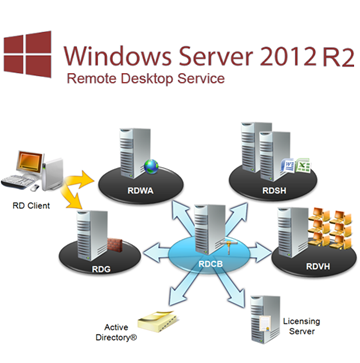
CCitrix has been in business for more than 20 years; it is the pioneer and market leader in the multi-user sector. But the question is always the same: „Do I need Citrix XenApp or XenDesktop—isn’t Microsoft Remote Desktop enough?„ Do I have to spend so much more money on Citrix? I was a Microsoft MVP for Remote Desktop Services (RDS) for many years, and I remember my last visit to Microsoft in Redmond. I had recommended changes and additions that have since become a reality with the current Windows Server 2012 R2. I don’t need to “sell” Citrix to anyone if Microsoft is sufficient for the customer’s needs. It always depends on the customer’s requirements, but a lot has changed, and it’s time to rethink things.
Citrix XenApp was and remains Citrix’s „flagship“ product; while Citrix has certainly added new features, it has also expanded its product line to include Netscaler, XenMobile, ShareFile, and others. For customers who only wanted XenApp, Citrix actually renamed the XenDesktop App Edition to XenApp, and only after that did customers begin installing XenDesktop 7.x without knowing what to expect.
Microsoft released Server 2012 R2 some time ago (and will soon release 2016), bringing with it Remote Desktop Services that have come of age. There is currently a lot of information available on this topic, but nothing that answers the question, „Do I still need Citrix?“ Citrix offers some advanced features such as NVIDIA GRID with servers, Reverse Seamless (local apps), Flash redirection, etc., but at the same time, it lacks features that RDS has had since day one; Copying and pasting files between client and server? A typical question among MVPs and CTPs is „when is enough enough?“ Does Hyper-V have enough functionality that I no longer need VMware? Do I need all those extra features? Is RDP—or whatever it’s called now, RemoteFX—enough? In the end, it’s often the administrator who doesn’t want any changes (I have to learn something new again…) and fights for his or her product. Customers should reconsider and re-evaluate whether they really need Citrix as an add-on for RDS. When I tell a customer, „RDS is right for you,“ I save them so much money that my fees are a joke.
So let’s get started. First off, I’m writing about Windows Server 2012 R2 RDS because it’s a significant improvement over 2008 R2 and less „painful“ in some areas. Second, I’m comparing it to XenApp 6.5 and not to XEN7 (XenApp/XenDesktop 7.x). The reason for this is that I want to focus on the core needs of most customers, and XEN7 goes far beyond that. Besides, it would make the article much too long, and it’s already difficult enough to keep it concise.
I remember the „good old days“ (I've been in the SBC business—as it was called—for so long) and it was all about the „Macro Level“when it came to Citrix’s value-added features. What I mean by that is: Citrix has „Seamless Apps“ and Microsoft only has the full desktop; Citrix has true load balancing and Microsoft only has the „poor“ Windows Network Load Balancing (WNLB); Citrix has bidirectional audio, Citrix has…, Citrix has… and Microsoft doesn’t. That changed with 2012 R2 from „From the “macro level„ to the “micro level” for most functions, except when it comes to specific requirements. What does that mean? It means that, for a basic multi-user environment, there aren’t really any major differences anymore. Okay, I still see some confused looks, and I know how much readers love lists that compare things.
|
Macro Level Comparison |
||
|
Feature |
Microsoft Server 2012 R2 |
Citrix XenApp 6.5 |
|
Audio |
Yes |
Yes |
|
Microphone |
Yes |
Yes |
|
Client Drives |
Yes |
Yes |
|
USB PnP Redirection |
Yes |
Yes |
|
LPT/COM Redirection |
Yes |
Yes |
|
Clipboard |
Yes |
Yes |
|
Smart Card |
Yes |
Yes |
|
Universal Printing |
Yes |
Yes |
|
Meeting Management |
Yes |
Yes |
|
Burden-sharing |
Yes |
Yes |
|
Highly available |
Yes |
Yes |
|
Proxy Sessions |
Yes |
Yes |
|
Seamless Apps |
Yes |
Yes |
|
WAN Optimized |
Yes |
Yes |
|
Profile Management |
Yes |
Yes |
|
Flash Redirect |
No |
Yes |
|
Basic Provision |
Yes |
Yes |
|
Session Linger |
Yes |
Yes |
|
Meeting Guidelines |
Yes |
Yes |
|
Mirror Sessions |
Yes |
Yes |
|
Clients |
Yes |
Yes |
|
Web-based access |
Yes |
Yes |
|
Special requirements |
||
|
Twain Redirect |
No |
Yes |
|
Preliminary Session |
No |
Yes |
|
Reverse Seamless* |
No |
Yes |
* I'm sure there are more advanced features, but I think the trend is clear. Upon closer inspection, it becomes clear that both products basically have the same or similar functionalities, except when it comes to specific requirements. In my opinion, however, many people don’t use these advanced features or don’t even know they exist (Reverse Seamless, anyone?). Furthermore, these special features in particular have their own issues or can cause problems (e.g., pre-launch).
Let’s take a look at some of the previous features at the „micro level“ and compare them.
|
Micro Level Comparison |
||||
|
Feature |
Microsoft Server 2012 R2 |
Result |
Citrix XenApp 6.5 |
Score |
|
Client Drives
|
Yes
|
1 0 0 0 0 0 0 |
Yes
|
1 1 1 1 1 1 1
|
|
Result |
|
1 |
|
7 |
|
Clipboard
|
Yes
|
1 1 |
Yes
|
1 0 |
|
Result |
|
2 |
|
1 |
|
Universal Printing
|
Yes
|
1 1 0 0 0 0 0 |
Yes
|
1 1 1 1 1 1 1 |
|
Result |
|
2 |
|
7 |
|
Burden-sharing
|
Yes
|
1 1 0 0 0 0 |
Yes
|
1 1 1 1 1 1 |
|
Result |
|
2 |
|
6 |
|
Highly available
|
Yes
|
1 1 1 0 |
Yes
|
1 1 1 1 |
|
Result |
|
3 |
|
4 |
|
Basic Provision
|
Yes
|
1 1 1 1 1 |
Yes
|
1 0 1 0 0 |
|
Result |
|
4 |
|
2 |
|
Clients
|
Yes
|
1 1 1 1 1 0 0 |
Yes
|
1 1 1 1 1 1 1 |
|
Result |
|
5 |
|
7 |
|
Overall result |
Microsoft Server 2012 R2 |
19 |
Citrix XenApp 6.5 |
34 |
These are just a few features I’ve picked out, but in my opinion, they clearly illustrate the difference between RDS 2012 R2 and Citrix XenApp—but don’t forget the extra features!
Some might think I’ve left this or that out, and that’s certainly true on both sides. In my opinion, the end result is more or less the same—that features need to be examined closely in detail, and that says a lot. These are all hard facts, so to speak, but the soft factors should also be taken into account. Microsoft RDS 2012 R2 impresses with its simple and fast deployment of the environment. You don’t have to be an expert to get it up and running, and the default settings are good. There aren’t many options for optimization, but that also means there isn’t much room for things to go wrong.
If you primarily use Windows, you’re in the perfect position for RDS, and it does exactly what it’s supposed to. The RDP client is rock-solid and doesn’t constantly throw up surprises with features that just don’t work anymore. Plus, you don’t have to worry about rolling out the client, since it comes with Windows Update. No long, complicated command lines are required to install the client. Configured via Microsoft Group Policy, the RDP client is quickly ready for use.
I firmly believe that many of the current XenApp 6.5 customers could easily migrate to 2012 R2. These companies have basic requirements that RDS can meet. However, my experience with Microsoft Support for RDS has been well below average. Microsoft Premium Support is a must for anyone who really hopes to get help with RDS.
Installing, customizing, and restricting applications—such as the desktop—is the same for both products. In fact, I use the same tools I use for Citrix, simply applied to RDS, and that’s it. Anyone familiar with Citrix XenApp shouldn’t encounter any surprises with Microsoft RDS.
Summary
Microsoft RDS 2012 R2 has a lot to offer and may be sufficient for many companies. Deployment is extremely simple; just install a few Server 2012 R2 instances and then run the RDS Wizard. Do you use Windows? Then the client is no problem and has been available for a long time. If you also want to use mobile devices, simply download the RDS app and enter the URL—that’s all there is to it.
What should I do—use RDS or Citrix? Make a list of the „micro-level“ features that are needed or not needed. Determine whether specific features like TWAIN or Reverse Seamless are necessary. Ask yourself whether the environment and feature requirements are likely to grow in the future. The company should have a vision and a budget. Then you can determine what fits best.
Q&A
Some people have asked if I myself pure RDS environments that I have implemented for clients?
Yes, even though I implement many Citrix solutions (not just XenApp and XenDesktop), I have set up several environments that run RDS exclusively. The first farm ran on Windows Server 2008 R1 for about 150 concurrent users, and just recently, an RDS farm based on Windows Server 2008 R2 with about 600 concurrent users—even over WAN links!
Why choose 2008 R2 instead of going straight to Server 2012 R2?
Because the new RDS licenses also have to be paid for, and this is a significant expense in the customer’s budget. Customers also see the Windows 8 desktop and are a little apprehensive about it, though this fear is unfounded. These customers should focus more on the differences in RDS deployment and be less concerned about the Windows 8 desktop.
What about the protocol? RDP, ICA?
There is a wealth of information on this topic available online, which is why I won’t go into it here. Just search for „Comparing Remoting Protocols“ or “RDP vs. ICA,” etc., and you’ll find what you’re looking for in no time.
Vote{extravote 82}
|
 German
  English
Hi Thomas,
In your macro list, under "SmartCard," select "YES" for RDS.
In our experience, it is not possible to log in using a smart card in the WebAccess Portal; there is no option to select a certificate.
Thanks, Oliver