


EAn Identity Provider (IdP) is required for ShareFile Enterprise, and Microsoft Active Directory Federation Service (ADFS) is often used as the IdP for this purpose. ShareFile and XenMobile work seamlessly together when XenMobile is used as the IdP. However, this would not allow for seamless integration with Windows clients that use the Outlook plug-in, Desktop Sync, etc. The solution is to use both IdPs at the same time, which is why it’s called DualIdP. With ADFS 2.0, the certificate (self-signed by ADFS) cannot be exported with a private key for signing so that it can be used with XenMobile. Even if it could, this would only be valid for one year before ADFS automatically generates a new self-signed certificate.
Citrix has an excellent document that explains how DualIdP works with XenMobile and ADFS (Configure ADFS and XenMobile as a dual identity provider) can be set up. However, I don’t want to bore anyone here, so I might enhance the document with a few screenshots. I have used the document myself, and in my opinion, there are a few things to add and one error to correct. What you should do is read my comments and use them along with the document to ensure a successful setup.
Comments on the document
- Site 3 reads: „PEM Encoding Algorithm – Drop down to DES„.
Even with DES and a 2048-bit key size, the resulting private key will only be 2036 bits long, and it won't work with ADFS. That is simply incorrect. You must DES3 for the PEM Encoding Algorithm Select this option so that the key size is set to 2048. - On page 7, it says: „Run PowerShell as an administrator on the ADFS server. Type: Get-ADFSProperties“
This won't work unless the ADFS cmdlets are loaded first. To load the cmdlets, run the following command in PowerShell: „Add-PSSnapin Microsoft.Adfs.PowerShell„ - After you finish the ADFS section and restart the ADFS service, it might not work! You may find the following in the ADFS event log: Event 133, which reads: „The private key for the certificate that was configured could not be accessed.“This is clearly a permissions issue with the ADFS service account when accessing the certificate for signing.”.
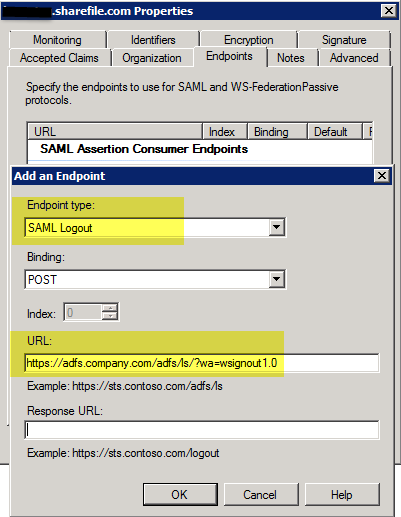
Make a note of the account used for the ADFS service, such as a network service or a specific user account used during the ADFS setup. Then follow the instructions: „Verify that the AD FS 2.0 service user account has access to the private keys for the certificates“ from the TechNet article Things to Check Before Troubleshooting AD FS 2.0 to grant the account permissions to access the certificate. Then restart the ADFS service. - On the last page: Logout URL: Logout URL to ADFS, e.g. https://adfs.company.com/adfs/ls/?wa=wsignout1.0 (This will need to be added as a logout point in ADFS if it hasn't been done already).
It is essential to follow this brief note; otherwise, you will receive an error message when logging out of ShareFile. To add the logout endpoint, go to the „Relying Party Trust“ settings and select „Endpoints.“ There, create a new "SAML Logout" endpoint.
I hope this helps you successfully set up DualIdP with XenMobile and ADFS.

 German
  English