

ECustomers often have misunderstandings about how data flows or how the process works when establishing a Citrix HDX connection. It’s actually quite simple, but sometimes persistent misconceptions. In my experience, images often convey more than words alone. This is the second part, which explains the process of connecting externally via the Citrix Gateway. It doesn’t go into every single detail, but it’s intended to provide a clearer picture of the basic process.
Only the main differences from the internal version are highlighted, not every detail.
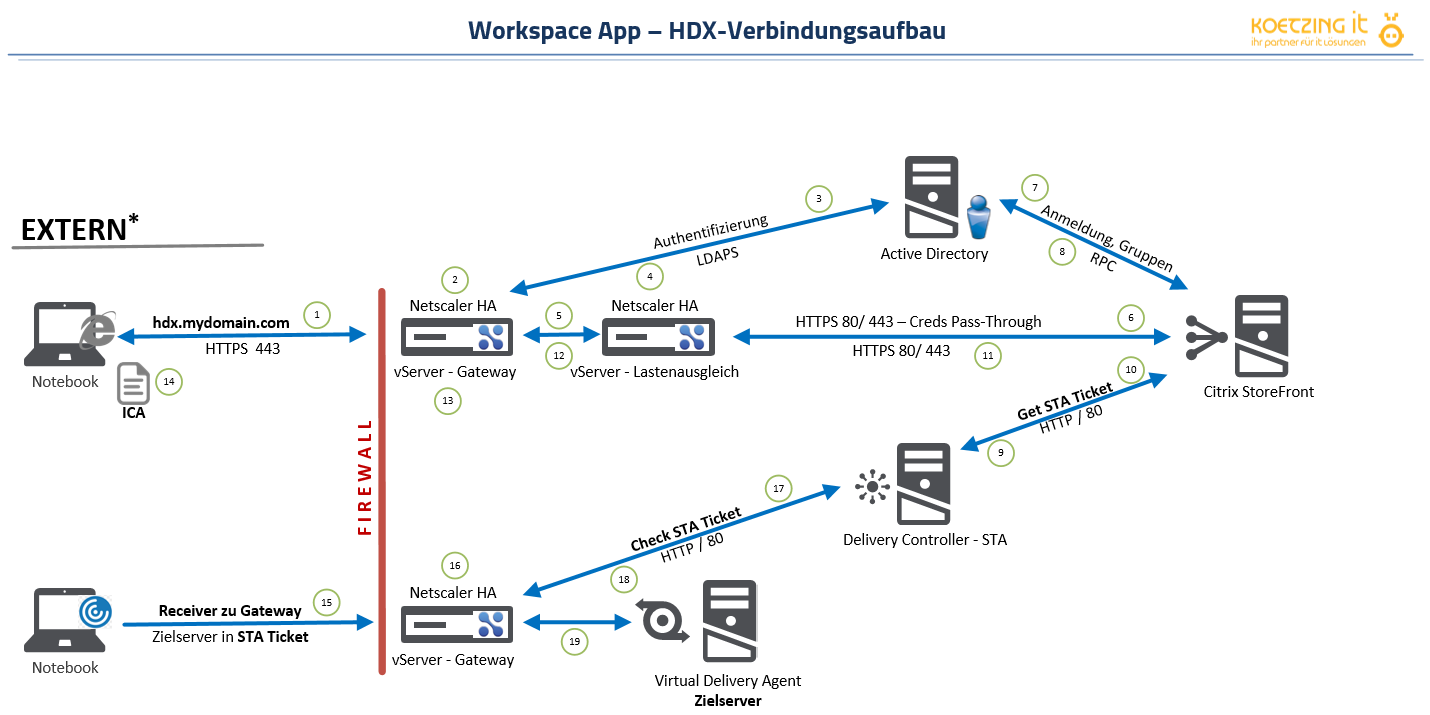
Note: For clarity, StoreFront and Delivery Controller are shown as two separate systems, but they could also be part of the same system. Similarly, vServer Gateway and vServer Load Balancing run on the same NetScaler.
STA Ticket = Time-limited ticket with destination server
ICA file = Parameter file for Workspace App
Destination server = VDA with the lowest current load
Explanation
hdx-mydomain.com is the internal and external URL that users use to launch their applications and/or desktops. The process begins with logging in to the gateway and authenticating via LDAP(s) and Active Directory (steps 1–8). Not shown here are the return of the application set and the launch of the application; instead, the process proceeds directly to the launch after login, followed by step 11, which involves sending the ICA file. This file is then used by the WorkspaceApp to establish the connection with the gateway. At the gateway, the SSL connection is terminated and the contained STA ticket is verified (16–18), after which the HDX connection to the target server is established.
 German
  English